Web3 MCP Servers: The Complete Map
By CROPR TeamTL;DR
Crypto MCP servers connect AI assistants to external market data, exchange accounts, blockchain activity, and portfolio information. Choose a server based on the data or actions your workflow requires, then check its authentication, permissions, and security model before connecting it. Most workflows will need a combination of servers rather than a single all-purpose solution.
AI assistants are getting remarkably good at reasoning, writing, coding, and working through complex problems. AI agents take that a step further by giving models access to tools and letting them work with information outside the conversation.
But an AI can only do so much with information it cannot access. That is where the Model Context Protocol, or MCP, becomes important. MCP gives AI assistants a standard way to discover and use external tools and data. And this becomes especially useful in blockchain and digital assets, where the information an AI needs is spread across market-data providers, exchanges, wallets, protocols, and onchain data platforms.
This has led to a growing ecosystem of web3 MCP servers. For example, the CROPR MCP lets agents query blockchain activity, interact with an exchange, inspect a wallet, or read portfolio information. This guide maps the main types of crypto MCP servers, what each one gives your AI, and what to consider before connecting one to your workflow.
What Is a Crypto MCP Server?
In one sentence, an MCP server is a menu of tools that an AI assistant can use. A crypto MCP server offers tools related to digital assets, such as market data, blockchain activity, wallets, exchanges, or portfolio information. The AI assistant can read all these available tools, choose the one that fits your question, and then call it.
You can think of it as a standard way to connect an AI to information or functionality that lives outside that model. What decides how good an MCP server is is what information or actions that server exposes.
A market-data server, for instance, gives your AI current prices and volume. An exchange server can inspect an account or place an order. A wallet or blockchain server can return balances, transactions, and onchain activity. A portfolio server can give the AI something closer to financial books: positions, PnL, and portfolio-level information. That distinction matters based on your needs.
The Four Types of Crypto MCP Servers
The current MCP ecosystem is easiest to understand by grouping servers according to what they do.
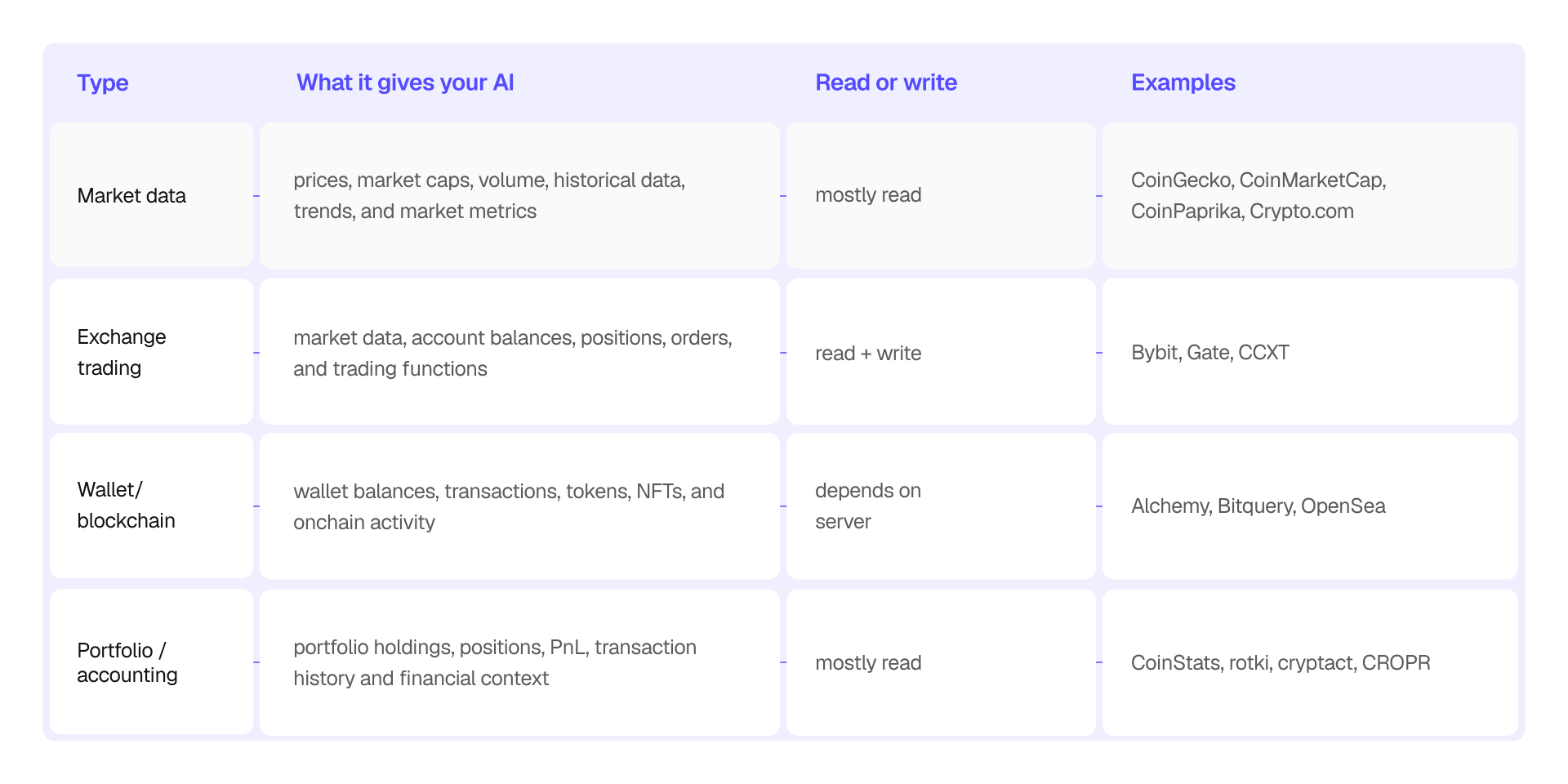
However, note that these categories can sometimes overlap.
For example, Bitquery can provide market-related information as well as wallet and transaction data. OpenSea combines wallet, token, and NFT data with transaction-building capabilities. Some exchange servers also expose market-data tools.
So treat the four categories as the map and not the territory.
Market Data MCP Servers
Market-data servers are the simplest place to start.
They give an AI access to information such as current prices, market capitalization, trading volume, historical data, market trends, and other metrics. This information lets an AI assistant answer questions based on reliable external data instead of relying only on its training data or questionable sources.
CoinGecko MCP server provides access to live and historical market information, including prices, charts, market data, DeFi pools, and NFT collections. CoinGecko says its MCP exposes 76+ tools covering more than one million assets. The best part is that you can access the server without signing up for an API key, subject to rate limits.
CoinMarketCap MCP server exposes market data covering more than 10,000 cryptocurrencies. Its current implementation provides 12 tools and is explicitly read-only: it does not place trades or perform exchange operations. That makes it a straightforward option when your AI needs broad market information but doesn't need account access.
CoinPaprika provides a hosted MCP server for crypto market data, with tools covering thousands of cryptocurrencies and hundreds of exchanges. CoinPaprika also maintains a separate DexPaprika MCP server for DEX-focused data. Its documentation, linked above, is also useful for developers interested in how to build a crypto MCP server. No API key sign-up required.
Crypto.com MCP server focuses on market data such as real-time prices, market capitalization, trading volume, and market trends. The official documentation is quite exhaustive, and there’s no need for an API key to access the server.
Exchange Trading MCP Servers
Exchange trading servers go one step further. In addition to public market information, they can connect the AI assistant/agent to crypto exchange accounts. Depending on the implementation and permissions you can grant, the server can access balances, open positions, order status, order management, and trade execution.
This, however, also changes your workflow’s security model. Giving an AI access to trading functions changes your risk profile. Your AI assistant can now place an order on your behalf. With that in mind, let’s have a look at the best Exchange Trading MCP servers out there.
Bybit official MCP server connects your AI assistant to market data and your Bybit account. To get started, you need to first sign up for a Bybit account and configure the API credentials. Once connected, you can check live prices, review balances and open positions, or manage orders. Note that the market-data tools work without API credentials, while account and trading tools require authenticated access. You can also use Bybit’s testnet to validate your setup before giving write access to your agents, which is quite handy.
Gate for AI connects your AI assistant to Gate’s market data, trading services, DEX tools, and token research features. You can directly get started with the server by connecting to your AI client. Market data and research tools work without authentication, while trading and account operations require authorization. You can also enable trading through an OAuth flow in your browser, without manually creating or entering API keys. Gate asks for explicit user confirmation for fund-related operations, though.
CCXT official MCP server is designed to run locally and connects AI agents to more than 100 exchanges through the unified CCXT API. It can expose market data and account balances, while trading permissions need to be enabled with user authorization. CCXT promises that the API keys remain on the user's machine and are not exposed to the model. Trading, withdrawals, and other higher-risk capabilities are kept in separate opt-in tiers.
Wallet and Blockchain MCP Servers
Wallet and blockchain MCP servers give AI assistants direct access to onchain information. Depending on the server, this can include wallet balances, token transfers, NFT holdings, transaction history, smart-contract data, and other blockchain activity.
Alchemy MCP server connects your AI assistant to blockchain data across 100+ networks through its 168 listed tools. After adding the server to your AI client, you need to sign in with your Alchemy account on first use. Once authenticated, you can query token prices, NFT metadata, transaction history, and smart contracts. You can also use the server to manage Alchemy apps and access blockchain RPC and data APIs. No API key or local installation is required. However, you’ll need to select an Alchemy app before using the RPC and data tools.
OpenSea MCP server connects your AI assistant to NFT, token, and wallet data across multiple blockchains. To get started, you need to create an OpenSea API key and connect the server to your AI client. Once connected, you can check token prices, research NFT collections, review wallet holdings, find trending assets, and get swap quotes using natural-language prompts. Some features, such as wallet-specific tools, require additional wallet authentication and permissions. OpenSea also supports transaction-related actions, including preparing NFT mint transactions and deploying NFT contracts.
Bitquery MCP Server connects your AI assistant to onchain trading data and wallet activity across nine blockchains. To get started, add the server to your AI assistant and sign in with your Bitquery account through OAuth. Once connected, you can query DEX trades, token prices, trading volume, OHLC candles, and wallet history. You can also trace fund movements across chains, investigate suspicious activity, and analyze wallet clusters. Access is read-only, and a free Bitquery account is enough to get started.
Portfolio and Accounting MCP Servers
Portfolio and accounting MCP servers give AI assistants context beyond individual transactions and wallet balances. They can expose information such as portfolio positions, profit and loss (PnL), net asset value (NAV), exposure, and transaction history, helping an AI understand how a portfolio is performing rather than simply reporting what a wallet holds.
CoinStats MCP server exposes live market data, portfolio performance, wallet balances, DeFi positions, exchange data, and crypto news. To set up, add the server to your AI client and authorize access through your CoinStats account. Once connected, you can compare prices across exchanges, review portfolio gains and losses, inspect wallet activity across 120+ blockchains, and track positions across thousands of DeFi protocols. Authentication uses OAuth, so you don’t need to paste API keys, and access can be revoked anytime. CoinStats MCP can read data but cannot sign transactions, trade, withdraw funds, or move assets.
Zerion MCP server helps AI coding assistants work with the Zerion API by giving them access to its documentation and OpenAPI specification. To get started, add the server to an AI client. Once connected, your assistant can look up endpoints and generate code for integrations involving wallet balances, transaction history, DeFi positions, and portfolio PnL. Note that you’ll need a Zerion API key to make authenticated data requests.
CROPR MCP: The Operating Layer for AI Agents
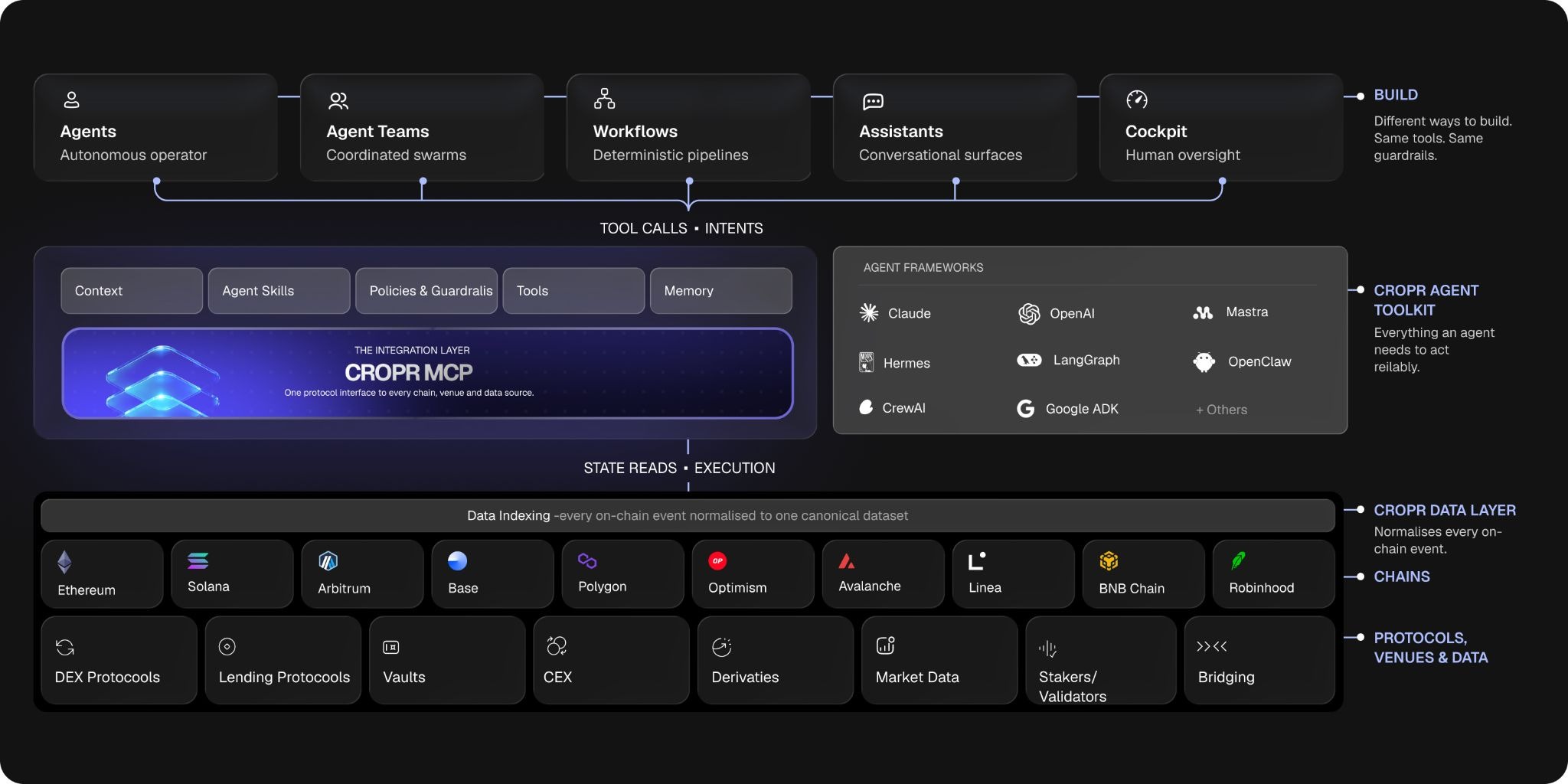
Most crypto MCP servers focus on individual data points, such as token prices, wallet balances, or transaction histories. CROPR takes a portfolio-level approach, bringing together onchain positions, performance, and risk information to help users make decisions and implement them.
After connecting and authenticating with CROPR, users will be able to explore the portfolio information available on the platform through prompts, without switching between interfaces. But the real deal is when the agents join the action. CROPR allows you to automate your workflows based on preset strategies. Combine this with CROPR’s MCP server, and you have a completely autonomous agentic workflow. The goal is to extend CROPR's portfolio tracking, reconciliation, reporting, and risk analysis to agentic execution.
How to Choose a Crypto MCP Server
The best crypto MCP server for you depends on what you want your AI agent to do.
If you want to keep things simple and only need current prices, market capitalization, volume, or historical market information, start with a market-data MCP. If you want your agents to interact with your exchange account, check out an exchange MCP. If you need wallet activity, blockchain transactions, token balances, or onchain analytics, look at a blockchain or wallet MCP. If you want your agent to understand your whole portfolio, a portfolio or accounting MCP is more appropriate.
You may occasionally come across the term DeFi MCP server. In practice, this usually describes an MCP focused on decentralized finance data or protocols rather than a separate technical category.
Most teams may need two or three MCP servers that cover different parts of the workflow. Once again, the right combination depends on the questions the AI needs to answer and whether the AI only needs to read information or also take actions.
Security should be part of the selection process from the beginning, especially when an MCP server can do more than return public information. Start by checking what permissions the server requires. A read-only server that uses public data has a very different risk profile from an exchange or wallet server that receives credentials or can initiate transactions.
MCP Server Security: What to Check
Next, check where credentials are stored and how authentication works. Current MCP implementations use different approaches, including API keys, OAuth, wallet authentication, and local credentials. OpenSea, for example, separates API-key access from wallet-scoped authentication, while Bitquery's hosted MCP uses OAuth 2.1.
Finally, look at the project itself. Is the repository active? Is there current documentation? Are permissions clearly documented? Can you restrict what the AI is allowed to do? For open-source crypto MCP servers, inspect the repository and dependencies rather than assuming that open source automatically means safe.
Where to Find More Crypto MCP Servers
The MCP ecosystem is changing quickly, so static lists can become outdated.
GitHub remains one of the most useful places to discover open-source projects. Curated lists such as Hive Intelligence's Awesome Crypto MCP Servers and the Web3 MCP Hub can help you find projects across market data, analytics, wallets, exchanges, and other categories.
You can also check other public MCP directories and, most importantly, keep an eye on the official documentation of the projects you are using. The directories will help you discover a server; the project's own documentation will guide you on how to implement them.
The Bottom Line
To reiterate, there is no single crypto MCP server that is right for every workflow. Each type of server solves different problems. The question you need to ask is what your AI needs to know or do. Once you get the answer to that, you can pick the MCP server/servers that give your AI the information and permissions it actually needs.
For professional teams, this distinction becomes more pronounced. An AI can only reason about a portfolio as well as the information available to it. We believe that CROPR is the best MCP server you get for your onchain digital assets portfolio management needs.
Frequently Asked Questions
What is a crypto MCP server?
A crypto MCP server connects an AI assistant to external tools and data related to digital assets. Depending on the server, it can provide market data, query blockchain activity, access exchange accounts, inspect wallets, or retrieve portfolio information through natural-language prompts.
What are the best crypto MCP servers?
The best crypto MCP server depends on your use case. CoinGecko, CoinMarketCap, and CoinPaprika provide market data; Bybit and Gate support exchange-related workflows; Alchemy and Bitquery offer blockchain data access; and CoinStats and CROPR focus on portfolio-related information. Compare their capabilities, authentication requirements, and permissions before choosing.
How do I connect a crypto MCP server to an AI assistant?
The setup depends on the server and AI client. Some offer hosted connectors that you can add through a settings menu, while others require a local installation or configuration file. You may also need an API key, an account login, OAuth authorization, or wallet authentication. Follow the provider's official setup instructions.
Are crypto MCP servers safe to use?
Their security depends on the implementation, the permissions granted, and how credentials are handled. A server that only reads public blockchain data has a different risk profile from one that can access exchange accounts or prepare transactions. Review the project's documentation, authentication model, permissions, and repository before connecting it to your workflow.
Can an AI agent trade cryptocurrency through an MCP server?
Yes, some MCP servers expose exchange trading tools that allow an AI assistant to submit or manage orders when the required credentials and permissions are configured. However, not every server supports trading. Use restricted API permissions, test environments where available, and appropriate human approval for consequential actions.
Do crypto MCP servers require an API key?
Not always. Some hosted servers allow users to connect through OAuth or access public data without an API key. Others require an API key for market data, account information, or higher usage limits. Requirements vary by provider and tool, so check the official documentation before setting up a connection.
What is the difference between a crypto MCP server and a crypto API?
A crypto API exposes data or functionality through endpoints that applications call directly. An MCP server makes compatible tools available to AI assistants through the Model Context Protocol, allowing the model to discover and use them as part of a conversation. Some MCP servers are built on top of existing APIs.
What is the difference between a blockchain MCP server and a portfolio MCP server?
A blockchain MCP server typically provides raw or relatively granular data, such as wallet balances, transactions, transfers, and smart-contract activity. A portfolio MCP server provides more aggregated financial context, such as positions, profit and loss (PnL), exposure, and portfolio performance. The distinction depends on the server, and some tools cover both.
Can I connect multiple crypto MCP servers to one AI assistant?
Yes, provided your AI client supports the relevant MCP connections. For example, you could combine a market-data server with a blockchain data server and a portfolio server. This gives your assistant access to different information sources, although the available tools, authentication requirements, and compatibility depend on each implementation.
What is a DeFi MCP server?
A DeFi MCP server provides AI assistants with access to decentralized finance data or functionality, such as lending positions, liquidity pools, token swaps, or protocol activity. DeFi MCP is a description of a server's focus rather than a separate technical standard. Its actual capabilities depend on the implementation and permissions.
What is CROPR MCP?
CROPR MCP is an MCP server from CROPR. The tool lets users access CROPR portfolio information through compatible AI assistants. It extends CROPR's portfolio tracking, reconciliation, and risk analysis capabilities into AI-assisted workflows.


